Deploying IPv6 DDNS Based on Cloudflare DNS
I have a Raspberry Pi at home that can obtain a public IPv6 address. However, the IPv6 address changes frequently, so I need to map the IPv6 address to a domain name. This will make configuring various services much more convenient in the future.
Requirements
I have a Raspberry Pi at home that can obtain a public IPv6 address.
However, the IPv6 address changes frequently, so I need to map the IPv6 address to a domain name. This will make configuring various services much more convenient in the future.
Reference Materials:
[1] Zhihu Column, “Deploying IPv6 DDNS Based on Cloudflare DNS API,”
[2] Cloudflare API v4 Documentation, “Update DNS Record”
[3] Cloudflare API v4 Documentation, “List DNS Records”
This guide is primarily based on article [1], with some minor updates.
Additionally, I referred to the official Cloudflare API documentation [2, 3] for specific API details.
Required Resources
- A domain name that is already hosted on Cloudflare. In this example, we’ll assume the domain is
114514.love. - A server with a public IPv6 address. In my case, it’s a Raspberry Pi 3B with the official OS installed.
Main Steps
1. Obtain the Required Keys
Go to the Cloudflare homepage → Click Websites on the left → Click the domain name in the middle to enter the domain settings page.
On the Overview page, there is an API section on the right where you can find Zone ID and Account ID.
The API Token needs to be retrieved via the “Get your API token” option, which requires password verification.
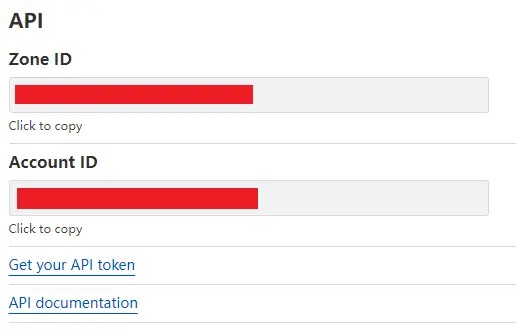
Make sure to save your keys securely and note down the following information:
- Your Cloudflare-registered email. (e.g.
senpei@imn.org) - Zone ID。which represents the domain being managed. (e.g.
Sleep-Black_Tea-ZoneID) - API token, obtained via Get your API token. (e.g.
nnnaaaAAAA!!!-APIToken) - DNS Record ID, which will be retrieved in the next step. (e.g.
OneSummerDREAM-RecordID)
2. Add an AAAA Record and Retrieve Its ID
Go to the Cloudflare homepage → Click Websites on the left → Select the domain → Navigate to DNS → Click Add Record.
Now, add a new DNS record, as shown below:
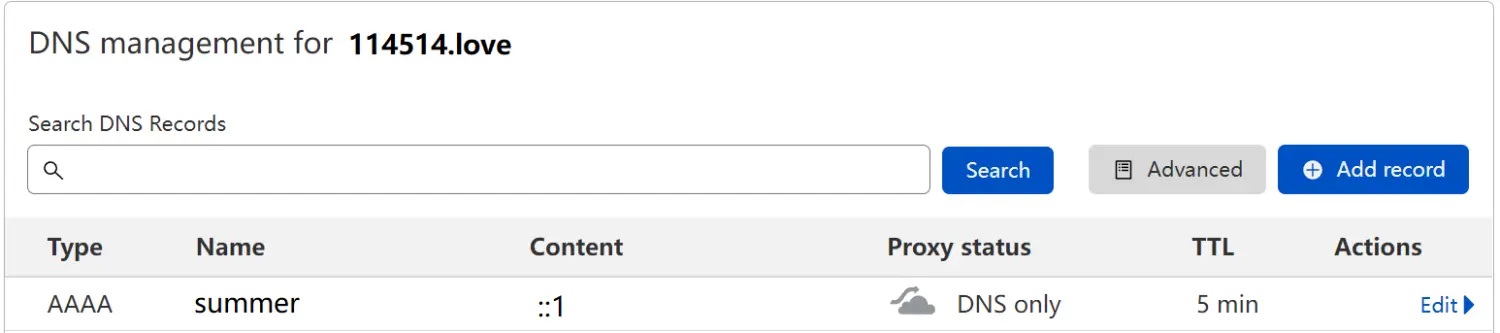
Here is the explanation of the fields:
- Type:
AAAA, indicating an IPv6 record. - Name: In this case, we use
summer, so the domain will besummer.114514.love. - Content: Initially, enter a placeholder IPv6 address, which will be updated via API later.
- Proxy Status: Click the orange icon to disable Cloudflare’s proxy. We only need DNS resolution here.
- TTL: Set an appropriate value. A longer TTL means slower DNS updates.
After creating the record, refer to the official API documentation [2] to retrieve the Record ID using a GET request.
You can use any method you prefer. The offical example uses curl, so we’ll use it in the Raspberry Pi’s Linux environment:
1
2
3
4
curl -X GET "https://api.cloudflare.com/client/v4/zones/Sleep-Black_Tea-ZoneID/dns_records?type=AAAA&name=summer.114514.love&page=1&per_page=100&order=type&direction=desc&match=all" \
     -H "X-Auth-Email: senpei@imn.org" \
     -H "X-Auth-Key: nnnaaaAAAA!!!-APIToken" \
     -H "Content-Type: application/json"
Refer to the documentation for detailed query parameters. The response may look something like this:
1
2
3
4
5
6
7
8
9
10
11
12
13
14
15
16
17
{
  "success": true,
  "errors": [],
  "messages": [],
  "result": [
    {
      "id": "OneSummerDREAM-RecordID",
      "zone_id": "Sleep-Black_Tea-ZoneID",
      "zone_name": "114514.love",
      "name": "summer.114514.love",
      "type": "AAAA",
      "content": "::1",

      "something": "blabla",
    }
  ]
}
The id under result is the Record ID for this entry. Make sure to save it.
3. Write the DNS Update Script and Schedule It
To update an existing DNS entry, refer to the official documentation [3].
The script needs to:
- Retrieve the local machine’s IPv6 address.
- Call Cloudflare’s API with a
PUTrequest to update the DNS record. - Run the script at regular intervals (e.g., every few minutes).
A more efficient approach would be to store the last known IPv6 address and only update when it changes, but I haven’t implemented that yet.
Since I’m more familiar with Python, I wrote the script in Python 3.6+ (required due to f-string usage).
Script to Update IPv6 Address:
1
2
3
4
5
6
7
8
9
10
11
12
13
14
15
16
17
18
19
20
21
22
23
import request

def update_addr(ipv6):
    email = 'senpei@imn.org'
    zone_id = 'Sleep-Black_Tea-ZoneID'
    api_key = 'nnnaaaAAAA!!!-APIToken'
    record_id = 'OneSummerDREAM-RecordID'

    url_target = f'https://api.cloudflare.com/client/v4/zones/{zone_id}/dns_records/{record_id}'
    headers = {
        'X-Auth-Email': email,
        'X-Auth-Key': api_key,
        'Content-type': 'application/json',
    }
    data = {
        'type': 'AAAA',
        'name': 'blackpi.100097.xyz',
        'content': ipv6,
        'ttl': 300,
        'proxied': False,
    }
    resp = requests.put(url_target, headers=headers, json=data)
    return resp
Script to retrieve IPv6 address:
1
2
3
4
5
6
7
8
9
import os
import re

def get_ipv6():
    command = 'ip -6 addr show dev eth0 | grep global'
    x = os.popen(command).read()
    result = re.findall(r'(([a-f0-9]{1,4}:){7}[a-f0-9]{1,4})', x, re.I)
    ipv6 = result[0][0]
    return ipv6
That’s it!